HOW TO SAP

Step by step manual guide with screenshot for Basis, Security Authorization & Abap

Popular Posts

  • Table USR02 - User Lock value
    Execute SE16 Enter USR02 Below are the value and its description: Value: 0 Not locked 16 Lock 32 Locked by CUA admin (User Ad...
  • SAP SECURITY INTERVIEW - FIND USER ID FROM TABLE PA0105
    You only  have Personal Number (PERNR) or Email (USRID_LONG) as reference SE16 > PA0105  Now enter PERNR or USRID_LONG SUBTY must be...
  • SAP SECURITY - Create authorization object and assign to user
    Authorization Objects are used to manipulate the current user's privileges for specific data selection and activities from within a pro...

Blog Archive

  • ▼  2019 (14)
    • ▼  July (4)
      • How to change SAP script - SE71
      • STMS – Transport management system. How to do tran...
      • SAP Basis – Daily check list
      • SAP R/3 Tips and Tricks – Cheat Sheet for Intervie...
    • ►  June (8)
    • ►  May (2)
  • ►  2018 (1)
    • ►  January (1)
  • ►  2017 (65)
    • ►  December (16)
    • ►  November (18)
    • ►  October (26)
    • ►  September (1)
    • ►  August (3)
    • ►  June (1)
  • ►  2014 (1)
    • ►  August (1)
  • ►  2013 (2)
    • ►  December (1)
    • ►  March (1)
  • ►  2012 (5)
    • ►  June (3)
    • ►  February (2)
  • ►  2011 (88)
    • ►  October (3)
    • ►  September (8)
    • ►  August (8)
    • ►  July (4)
    • ►  June (14)
    • ►  May (22)
    • ►  April (11)
    • ►  March (14)
    • ►  February (2)
    • ►  January (2)
  • ►  2010 (1)
    • ►  October (1)
  • ►  2009 (17)
    • ►  October (12)
    • ►  September (1)
    • ►  August (3)
    • ►  June (1)
  • ►  2008 (20)
    • ►  January (20)
2013-2017. Powered by Blogger.
HOW TO SAP

GRC 10 - Firefighter tcode

October 30, 2017   ffid, firefighter, grc 10, tcode,
Child system/GRCPI/GRIA_EAM
CentralizedGRAC_SPM
Continue Reading

SPRO missing entry - launch with tcode SIMGH

October 27, 2017   Authorization, missing entry, security, SIMGH, spro,

  • Launch SIMGH
  • Find structure under IMG structure
  • Then click display
  • Continue Reading

    How to Created Background Jobs in SAP - SM36

    October 26, 2017   background job, sm36,
    Background jobs in SAP system run in the background without affecting normal operations in the system. These jobs are used to reduce manual effort and to automate the process. They can run in the background without any user input and can be scheduled to run when the system load is low.
    Background jobs can be divided into three categories −

    Class A (High Priority)

    This is used for urgent or critical tasks and must be scheduled with class A priority job. Class A job reserves one or more background work processes.

    Class B (Medium Priority)

    These jobs are executed after the completion of high priority jobs of Class A.

    Class C (Low Priority)

    The jobs in this category run once class A and class B jobs are completed.
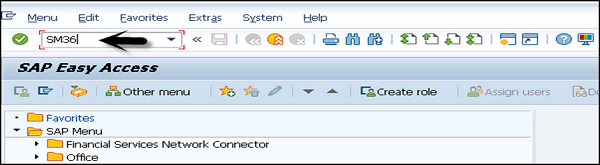
    Transaction Code SM36
    SAP SM36

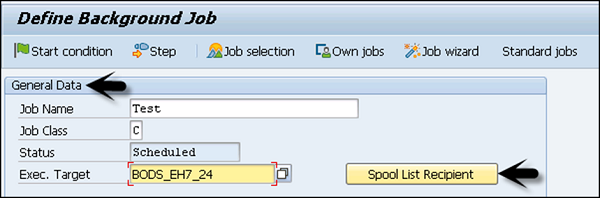
    General Data

    Enter the Job Name and its Priority.
    Select the target server on which you want to execute the job. This is used for load balancing; you can define the target server on which you want to run the job.
    Define Background
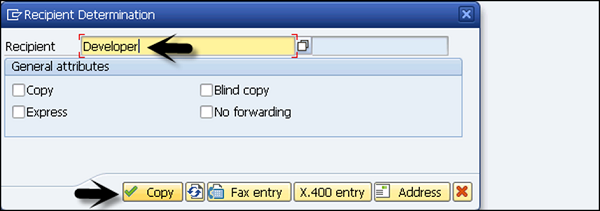
    Using Spool List Recipient, enter the email id if you want to get the results in email.
    Recipient
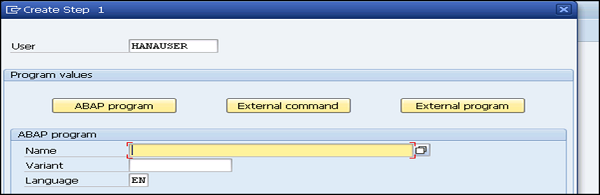
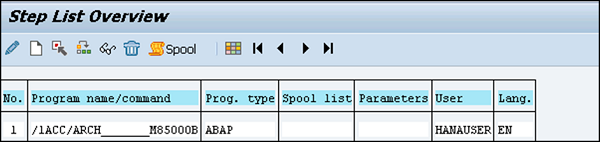
    To define the steps for execution, go to the Step Tab. Enter program name, variant name in the field. If you have not created variant as per your requirement, then leave it blank. Click on the save button at the bottom.
    Create Step 1List Overview
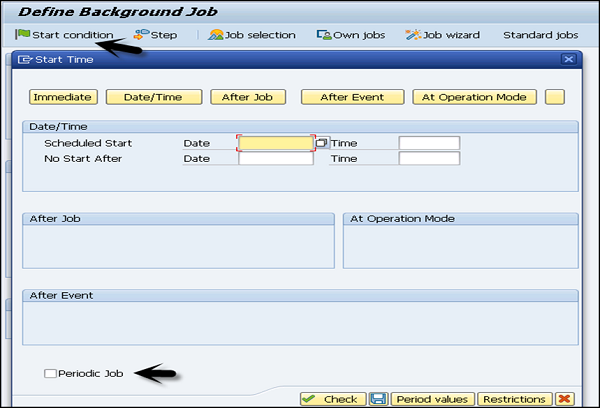
    To pass the start condition, enter the start date, end date, frequency, etc. In case the start condition is not specified, then the job will remain in scheduled state and will not run. Various options can be used to define the start condition. To create a periodic job, select the box at the bottom.
    Background Job
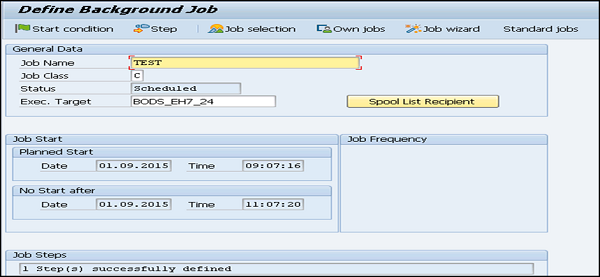
    Once the schedule is defined, click on Save.
    Schedule is Defined

    Continue Reading

    SSO Parameter value

    October 25, 2017   Authorization, parameter, security, sso,


    login/password_change_for_SSO
    Handling of password change enforcements in Single Sign-On situations

    Valid Input, Formats, Areas:

     0 =  Ignore requirement for password change(=> backward compatible)
     1 = Popup with selection 2 or 3 (User decides, default)
     2 = Password change dialog only (Entry: Old and new password)
     3 = Deactivation of password (automatic, no popup)
    Continue Reading

    Frequently used SE16 Tables for SAP security authorization

    October 25, 2017   Authorization, se16, security, tables,

    • AGR_USERS : Assignment of roles to users  Basis - ABAP Authorization and Role Management
    • AGR_TCODES : Assignment of roles to Tcodes  Basis - ABAP Authorization and Role Management
    • BUT100 : BP: Roles  Basis - Use AP-MD-BP* Components
    • SRRELROLES : Object Relationship Service: Roles  Basis - General Object Relations
    • EKPA : Partner Roles in Purchasing  MM - Purchasing
    • AGR_AGRS : Roles in Composite Roles  Basis - ABAP Authorization and Role Management
    • AGR_DATEU : Personal settings for roles  Basis - ABAP Authorization and Role Management
    • AGR_USERT : Assignment of roles to users  Basis - ABAP Authorization and Role Management
    • AAA_ROLES2 : SAP Authorization Assistant - Roles no longer Managed  Basis - ABAP Authorization and Role Management
    • AAA_ROLES : SAP Authorization Assistant - Roles Managed by Tool  Basis - ABAP Authorization and Role Management
    • AGR_TCDTXT : Assignment of roles to Tcodes  Basis - ABAP Authorization and Role Management
    • EHSWAT100 : MD (BDT): Business Partner Roles  Environment, Health and Safety - Waste Management
    • CACS_AGRROL : Participant Roles in Participation Agreement  ICM - Incentive and Commission Management (ICM)
    • AGR_SELECT : Assignment of roles to Tcodes  Basis - ABAP Authorization and Role Management
    • AGR_TCODE3 : Assignment of roles to Tcodes  Basis - ABAP Authorization and Role Management
    • BPFRG : OBSOLETE TABLE: Business Partner: Roles for Release  Fi Services - Business Partner
    • USLA04 : CUA: Assignment of Users to Roles  Basis - User and Authorization Management
    • USRSYSACT : CUA: Roles in Distributed Systems  Basis - User and Authorization Management
    • TB003T : BP Roles: Texts  Basis - Use AP-MD-BP* Components
    • USRSYSACTT : CUA: Roles in Distributed Systems  Basis - User and Authorization Management
    • TB003E : BP Role Exclusion Groups -> BP Roles  Basis - Use AP-MD-BP* Components
    • DPR_RATES : Customizing: Cost/Revenue Rates for Project Roles  PPM - cProjects Accounting Integration
    • TDLOAN_CPPART : Default Sttng of Permitted Roles and Roles for Partner Copy  Fi Services - Loans Management
    • TE673 : Installation Roles in an Installation Group  IS - Contract Billing
    • TE673T : Names of Installation Roles  IS - Contract Billing
    • AGR_USERS - Assignment of roles to users  Basis - ABAP Authorization and Role Management
    • AGR_1251 - Authorization data for the activity group  Basis - ABAP Authorization and Role Management
    • AGR_DEFINE - Role definition  Basis - ABAP Authorization and Role Management
    • AGR_TCODES - Assignment of roles to Tcodes  Basis - ABAP Authorization and Role Management
    • AGR_1252 - Organizational elements for authorizations  Basis - ABAP Authorization and Role Management
    • AGR_HIER - Table for Structure Information for Menu  Basis - ABAP Authorization and Role Management
    • AGR_AGRS - Roles in Composite Roles  Basis - ABAP Authorization and Role Management
    • UST12 - User master: Authorizations  Basis - User and Authorization Management
    • AGR_PROF - Profile name for role  Basis - ABAP Authorization and Role Management
    • PRGN_CUST - Customizing settings for authorization process  Basis - ABAP Authorization and Role Management
    • USR10 - User master authorization profiles  Basis - User and Authorization Management
    • BUT100 - BP: Roles  Basis - Use AP-MD-BP* Components
    • AGR_TEXTS - File Structure for Hierarchical Menu - Customer  Basis - ABAP Authorization and Role Management
    • SSM_CUST - Set Values for the Session Manager / Profile Generator  Basis - Session Manager
    • USR12 - User Master Authorization Values  Basis - User and Authorization Management
    Continue Reading
    Newer Posts Older Posts Home
    Subscribe to: Posts (Atom)
    Designed By: Blogger Templates | Templatelib