HOW TO SAP

Step by step manual guide with screenshot for Basis, Security Authorization & Abap

Popular Posts

  • How to change SAP script - SE71
    1. Firstly open SE71. Enter the Form name. 2. Click change 3. Click on Page window 4. You can now change the attributes. 5. O...
  • SAP BASIS - Hana Cockpit explain
    The SAP HANA cockpit is an SAP Fiori Launchpad site that provides you with a single point-of-access to a range of Web-based applications  f...
  • HOW TO CHECK SIZE OF A CLIENT Note 118823 - CC-ADMIN: Size of a client
    SAP NOTE 118823 - CC-ADMIN: Size of a client Symptom To be able to schedule client copies and also for system planning, the size of clien...

Blog Archive

  • ►  2019 (14)
    • ►  July (4)
    • ►  June (8)
    • ►  May (2)
  • ►  2018 (1)
    • ►  January (1)
  • ►  2017 (65)
    • ►  December (16)
    • ►  November (18)
    • ►  October (26)
    • ►  September (1)
    • ►  August (3)
    • ►  June (1)
  • ►  2014 (1)
    • ►  August (1)
  • ►  2013 (2)
    • ►  December (1)
    • ►  March (1)
  • ►  2012 (5)
    • ►  June (3)
    • ►  February (2)
  • ▼  2011 (88)
    • ▼  October (3)
      • HOW TO SAP - Check IGS services in portal
      • SAP HOW TO GRC Add CUA SYSTEM
      • HOW TO SAP - GRC creating connectors
    • ►  September (8)
    • ►  August (8)
    • ►  July (4)
    • ►  June (14)
    • ►  May (22)
    • ►  April (11)
    • ►  March (14)
    • ►  February (2)
    • ►  January (2)
  • ►  2010 (1)
    • ►  October (1)
  • ►  2009 (17)
    • ►  October (12)
    • ►  September (1)
    • ►  August (3)
    • ►  June (1)
  • ►  2008 (20)
    • ►  January (20)
2013-2017. Powered by Blogger.
HOW TO SAP

HOW TO SAP - Check IGS services in portal

October 19, 2011   IGS,

  1. Open this link http://server:40XX80/
  2. Where XX is the instance number
  3. You will see this result:
Continue Reading

SAP HOW TO GRC Add CUA SYSTEM

October 05, 2011   CUA SYSTEM, grc,

CUA system must also be maintain in front end GRC - not just back end  ABAP CUA system.


  1. Login to GRC system
  2. Go Configuration > CUA System
  3. Create (system is your child while CUA system is the parent)


    Save


Continue Reading

HOW TO SAP - GRC creating connectors

October 05, 2011   connectors, grc,

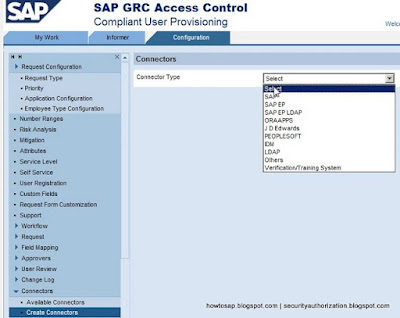
Connector in GRC like ABAP RFC. Connector is used to connect front end GRC to the backend ABAP system.


  1. Open GRC CUP > Configuration > Connectors > Create Connectors
  2. Fill in the details
  3. Now you may test the connection
  4. If successful, you will see below
Continue Reading
Newer Posts Older Posts Home
Subscribe to: Posts (Atom)
Designed By: Blogger Templates | Templatelib