HOW TO SAP

Step by step manual guide with screenshot for Basis, Security Authorization & Abap

Popular Posts

  • HOW TO SAP - Create RFC TCPIP connection and Register Server Program with RFCEXEC
    Execute SM59 Expand TCP/IP connections > Click Create Enter the following details. Ensure connection type is 'T' Save a...
  • How to change SAP script - SE71
    1. Firstly open SE71. Enter the Form name. 2. Click change 3. Click on Page window 4. You can now change the attributes. 5. O...
  • HOW TO SAP - Work Load Monitor - ST03N
    ST03N is used to analyse system performance. It can also be used to to monitor workload & transaction executed by use 1. ST03N > La...

Blog Archive

  • ▼  2019 (14)
    • ▼  July (4)
      • How to change SAP script - SE71
      • STMS – Transport management system. How to do tran...
      • SAP Basis – Daily check list
      • SAP R/3 Tips and Tricks – Cheat Sheet for Intervie...
    • ►  June (8)
    • ►  May (2)
  • ►  2018 (1)
    • ►  January (1)
  • ►  2017 (65)
    • ►  December (16)
    • ►  November (18)
    • ►  October (26)
    • ►  September (1)
    • ►  August (3)
    • ►  June (1)
  • ►  2014 (1)
    • ►  August (1)
  • ►  2013 (2)
    • ►  December (1)
    • ►  March (1)
  • ►  2012 (5)
    • ►  June (3)
    • ►  February (2)
  • ►  2011 (88)
    • ►  October (3)
    • ►  September (8)
    • ►  August (8)
    • ►  July (4)
    • ►  June (14)
    • ►  May (22)
    • ►  April (11)
    • ►  March (14)
    • ►  February (2)
    • ►  January (2)
  • ►  2010 (1)
    • ►  October (1)
  • ►  2009 (17)
    • ►  October (12)
    • ►  September (1)
    • ►  August (3)
    • ►  June (1)
  • ►  2008 (20)
    • ►  January (20)
2013-2017. Powered by Blogger.
HOW TO SAP

Why is SAP authorization profile red or yellow?

October 22, 2017   Authorization, pfcg, profile, security,

When you change a role, you must regenerate the authorization profile. In this case, the status of the profile generation is displayed red or yellow at the top of the Authorizations tab page, and is explained in more detail further down the tab page with a short text:


·        If the status display is red, you must perform an authorization data comparison, since the menu was changed since the last profile generation or no authorization data exists.
·        If the display is yellow, the authorization data for the role was changed and saved after the last generation. The generated profile is no longer current. You need to regenerate it.
Continue Reading

SAP BASIS - Hana Cockpit explain

October 22, 2017   sap hana,
The SAP HANA cockpit is an SAP Fiori Launchpad site that provides you with a single point-of-access to a range of Web-based applications for the administration of SAP HANA.

The SAP HANA cockpitis installed with SAP HANA as automated content.

-which user has authorization for SAP HANA Cockpit?

After database creation, you will have to log on for first time as the user SYSTEM. In this case, the required roles will be assigned automatically
In order to access SAP HANA Cockpit the following roles need to be assigned.

sap.hana.admin.roles::Monitoring
or
sap.hana.admin.roles::Administrator

These roles allow you to open the cockpit and access the tiles in the
SAP HANA Database Administration
 catalog.

If you're opening the cockpit on the system database of a multiple-container, you also need the role
sap.hana.admin.cockpit.roles::SysDBAdmin
 so that you can access the tiles in the
SAP HANA System Administration
 catalog.


-How can I access SAP HANA Cockpit?

You could access SAP HANA Cockpit directly through the url or you could go to SAP HANA Studio -->Right Click on the System in Navigation Pane --> Configuration and Monitoring --> Open SAP HANA Cockpit

System type SAP HANA Cockpit URL

Single-container system http://<host_FQDN>:<port>/sap/hana/admin/cockpit
System DB of multi-container system http://<host_FQDN>:<port>/sap/hana/admin/cockpit
Tenant DB in  multi-container system http://<tenant_DB_FQDN>:<port>/sap/hana/admin/cockpit


-Does SAP HANA Cockpit have all functionality as in SAP HANA Studio?

No, as of SAP HANA SPS 10 not all functionality is available in SAP HANA Cockpit compared to SAP HANA Studio.
SAP HANA Developmnet is constantly improving and adding new functionalities to SAP HANA Cockpit.


-From which revision is SAP HANA Cockpit available?

SAP HANA Cockpit is available only starting SPS 09.

-Can I access SAP HANA cockpit when the DB is offline?
No, SAP HANA cockpit is not available when the DB is down.

-Is there a mode similar to diagnosis mode in cockpit when SAP HANA Database is not available?

Starting SPS11, we have an offline mode in SAP HANA cockpit. To access the offline mode there are two options:

navigate from standard SAP HANA cockpit
https://<host>:1129/lmsl/hdbcockpit/<SID>/index.html

-Can we access load graph also from SAP HANA Cockpit?

Yes, load graph is available in SAP HANA Cockpit.
SAP HANA Cockpit --> Tile “SAP HANA Database Administration” --> Clicking on any of the tile "used memory, CPU usage, disk usage" leads you to screen with load graph.
You need to select the KPI that you want to analyze


-Is it possible to take backups via SAP HANA Cockpit?
Yes, backups can be triggered from SAP HANA Cockpit.
Please note to trigger delta backup from SAP HANA Cockpit minimum requirement is SAP HANA SPS11.

-Can we monitor alerts and configuration within SAP HANA Cockpit?
Alert monitoring and alert configuration is possible with the SAP HANA cockpit only if the monitoring and alerting
functions in the system are being implemented by the embedded statistics service, not the statistics server.
SAP HANA revisions above 93 automatically have embedded statistics service.

-Is there a separate HANA cockpit for tenant database administrators?
No, there is only one SAP HANA cockpit per Database. You can administrate the tenants through System DB administrator on cockpit.

-Is it possible to configure parameters within SAP HANA cockpit?
No, configuring parameters still need to be performed using SAP HANA studio.

-Is there a special view in HANA cockpit for Multitenant database?
Yes, on multitenant database systems there is tile catalog "SAP HANA System Administration" that gives an overview on tenants and their status.


Click on Manage Database tile to get additional information


-Is there a section Diagnosis files in SAP HANA cockpit?

Yes, there is a tile “Number of Dumps” in Tile catalog “SAP HANA Database Administration”, this will open a new window for SAP-based development workbench that contains the traces.

Please note in multitenant system, the trace section holds only the traces of the System DB and not the tenant DB, therefore no indexserver traces would be available.


-Is there a possibility to view the memory allocation?


Yes, Go to Tile “Manage Services” under catalog “SAP HANA Database Administration”, then click on the used memory of any service.

 A new window will show the memory allocation:


Please note for multitenant database this view is from single tenant database.

-Where can I monitor threads/sessions in SAP HANA Cockpit?

Unfortunately, threads/sessions monitor is not yet available in cockpit so SAP HANA studio needs to be used.
Continue Reading

What is SU24 and how to maintain authorization object

October 20, 2017   su24,
Source: http://sapsecurityanalyst.com/WP/general-disclaimer/su24-concept-in-sap
Tcode is like a command which when executed executes an ABAP program, report etc. When the program gets executed, it may check for certain authorization objects.
These authorization objects are coded in the program under “AUTHORITY-CHECK” statement.
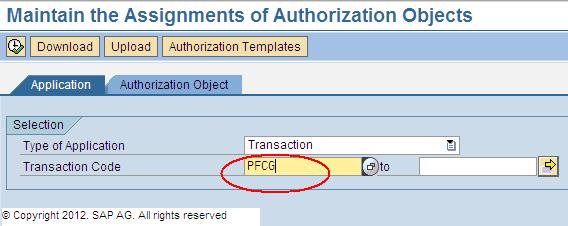
SU24 is one of the most important tcodes in SAP Security. It is used to maintain authorization objects that are checked during the execution of a particular transaction code. 
For example – a screenshot of SU24 entry for PFCG transaction code is shown in the below figure:


SU24 is like a check and check-maintain “container” which is used for maintaining those authorization objects which are checked when ABAP programs are executed.
Whenever any tcode (or program) is executed and if it checks if the user has access to some authorization object performing the task concerned, then it is always a good practice to add that authorization object in SU24 entry for that transaction code.
Lets go through some of the important concepts related to SU24 tcode. For that lets have a look at the SU24 screenshot for tcode FPE3S below:

As we can see this screen shows SU24 entries for tcode FPE3S. On the left side, we have tcode name and description and on the right side, we have authorization objects and other fields like TSTCS, Check Indicator and Proposal.
The Object field shows the list of authorization objects which are checked for tcode FPE3S.
We have already discussed that SU24 maintains the authorization objects which are checked by a tcode. Although just maintaining any authorization object does not mean that the object will be checked. It is necessary that the object is coded in the “Authority-Check” statement in the ABAP code. Simply inserting an authorization object in SU24 which is not checked in the program is not going to make any difference.
SU24 provides us with an option to set if any authorization object can be set to “Do not check”, i.e even if the object is coded in the program, the object will not be checked while executing the tcode. As shown in the figure above, we can see that Check Indicator Field gives us this option to set the authorization object check value to “Check” or “Do Not Check”.
Next to Check Indicator field is Proposal field. It can have values “Yes” or No”. Lets discuss this “Proposal” field via the below screenshot:


We can see in the above figure that for object F_KKKO_BEG, the proposal value is set to “Yes”.
If we double click on the object F_KKKO_BEG or if we click on “Field Values” (as shown in the figure), we get to see some authorization field values for object F_KKKO_BEG at the bottom of the screen as shown above. These are the proposed values and when the tcode FPE3S (as per this example) is added to any role menu, these values automatically get pulled in the role.
These are helpful as the important objects which are set to proposal “Yes” automatically get pulled to the role and thus are very helpful in role maintenance.
If the proposal value is set to “No” and the Check Indicator is set to “Check”, then it means that the object will be checked while tcode execution but no default proposed value gets pulled to the role during assignment of tcode to the role menu.
Lets have a summarized look at what we discussed about check indicators: 
  • Check / No – Authorization object is checked while tcode execution, but No authorization object field value is proposed when tcode is added to Role Menu.
  • Check / Yes – Authorization object is checked while tcode execution and the authorization object automatically gets pulled in the role when the tcode is added to Role Menu. The authorization which is pulled may or may not have some field values depending on what is maintained in SU24 in that object for that tcode.
  • Do Not Check – The object is not checked even though it may be in the ABAP Code.

NOTE : 
The  Do Not Check check indicator CANNOT be set or HR and BASIS tcodes.
Continue Reading

How to Assigning Authorization objects to Users in BI/BW

October 20, 2017   Authorization,


Source: 
http://ilovesapsecurity.blogspot.my/2012/05/assigning-authorization-objects-to.html


Assigning Authorization Objects to Users:
 
# Go to the screen (RSECADMIN) , and click on assignment button under user tab: 


# Now we can assign the created Authorization Object to any user using this tool. 


# Adding the created Authorization Object (ZDWKJTEST) to the user ZNBITSRTS. I will be using the same user through out this blog for running any query so that it can use the restrictions which are applying using the Authorization Object.


# We can also assign the authorization to users through role/profile using the standard Authorization Object S_RS_AUTH:


# User with Authorization Object 0BI_ALL is having full access to data, and can overwrite any other Authorization Objects assignment to it. 


# Query on InfoProvider with Authorization Objects: Below is the test query in which I added the InfoObject for which we created the test Authorization Object (ZDWKJTEST).


Continue Reading

Alternative to ST01 system trace using Tcode STAUTHTRACE for multiple system at a time

October 19, 2017   st01, stauthtrace, system trace,

  • Execute STAUTHTRACE
  • Click System-Wide Trace
  • Select all system
  • Enter a user ID to trace.
  • Click Activate trace
  • Once done, you may evaluate the log
  • Continue Reading
    Newer Posts Older Posts Home
    Subscribe to: Posts (Atom)
    Designed By: Blogger Templates | Templatelib