HOW TO SAP

Step by step manual guide with screenshot for Basis, Security Authorization & Abap

Popular Posts

  • HOW TO SAP - Create RFC TCPIP connection and Register Server Program with RFCEXEC
    Execute SM59 Expand TCP/IP connections > Click Create Enter the following details. Ensure connection type is 'T' Save a...
  • How to change SAP script - SE71
    1. Firstly open SE71. Enter the Form name. 2. Click change 3. Click on Page window 4. You can now change the attributes. 5. O...
  • HOW TO SAP - Work Load Monitor - ST03N
    ST03N is used to analyse system performance. It can also be used to to monitor workload & transaction executed by use 1. ST03N > La...

Blog Archive

  • ▼  2019 (14)
    • ▼  July (4)
      • How to change SAP script - SE71
      • STMS – Transport management system. How to do tran...
      • SAP Basis – Daily check list
      • SAP R/3 Tips and Tricks – Cheat Sheet for Intervie...
    • ►  June (8)
    • ►  May (2)
  • ►  2018 (1)
    • ►  January (1)
  • ►  2017 (65)
    • ►  December (16)
    • ►  November (18)
    • ►  October (26)
    • ►  September (1)
    • ►  August (3)
    • ►  June (1)
  • ►  2014 (1)
    • ►  August (1)
  • ►  2013 (2)
    • ►  December (1)
    • ►  March (1)
  • ►  2012 (5)
    • ►  June (3)
    • ►  February (2)
  • ►  2011 (88)
    • ►  October (3)
    • ►  September (8)
    • ►  August (8)
    • ►  July (4)
    • ►  June (14)
    • ►  May (22)
    • ►  April (11)
    • ►  March (14)
    • ►  February (2)
    • ►  January (2)
  • ►  2010 (1)
    • ►  October (1)
  • ►  2009 (17)
    • ►  October (12)
    • ►  September (1)
    • ►  August (3)
    • ►  June (1)
  • ►  2008 (20)
    • ►  January (20)
2013-2017. Powered by Blogger.
HOW TO SAP

STMS > Transport button mising

February 02, 2012   stms, TRANSPORT,
Transport button(truck) missing

STEPS
  1. One of the transport request from the import buffer/queue does not have the "Target Client ".
  2. Click on "set target client" button and enter a client number.
  3. Buttons will appear after this
Continue Reading

STMS > STORAGE_FREE_FAILED

February 02, 2012   stms, TRANSPORT,
STMS failed with abap dump "STORAGE_FREE_FAILED"


STEPS:
  1. SNote 148005 and 159616.
  2. Kernel patch in Release 4.5B.
  3. In Release 4.5A, the downwards compatible 4.5B kernel (with the corresponding patch level) must be imported.


Continue Reading

HOW TO SAP - Check IGS services in portal

October 19, 2011   IGS,

  1. Open this link http://server:40XX80/
  2. Where XX is the instance number
  3. You will see this result:
Continue Reading

SAP HOW TO GRC Add CUA SYSTEM

October 05, 2011   CUA SYSTEM, grc,

CUA system must also be maintain in front end GRC - not just back end  ABAP CUA system.


  1. Login to GRC system
  2. Go Configuration > CUA System
  3. Create (system is your child while CUA system is the parent)


    Save


Continue Reading

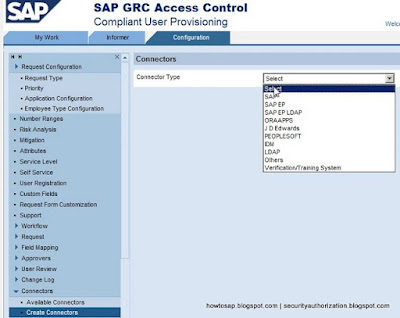
HOW TO SAP - GRC creating connectors

October 05, 2011   connectors, grc,

Connector in GRC like ABAP RFC. Connector is used to connect front end GRC to the backend ABAP system.


  1. Open GRC CUP > Configuration > Connectors > Create Connectors
  2. Fill in the details
  3. Now you may test the connection
  4. If successful, you will see below
Continue Reading
Newer Posts Older Posts Home
Subscribe to: Posts (Atom)
Designed By: Blogger Templates | Templatelib