HOW TO SAP

Step by step manual guide with screenshot for Basis, Security Authorization & Abap

Popular Posts

  • HOW TO SAP - Work Load Monitor - ST03N
    ST03N is used to analyse system performance. It can also be used to to monitor workload & transaction executed by use 1. ST03N > La...
  • HOW TO SAP - Create RFC TCPIP connection and Register Server Program with RFCEXEC
    Execute SM59 Expand TCP/IP connections > Click Create Enter the following details. Ensure connection type is 'T' Save a...
  • Useful SAP Security Tcodes
    Security - General tcodes SM20 Analysis of Security Audit Log SM19 Security Audit Configuration STRUSTSSO2 Trust Manager for Logon T...

Blog Archive

  • ▼  2019 (14)
    • ▼  July (4)
      • How to change SAP script - SE71
      • STMS – Transport management system. How to do tran...
      • SAP Basis – Daily check list
      • SAP R/3 Tips and Tricks – Cheat Sheet for Intervie...
    • ►  June (8)
    • ►  May (2)
  • ►  2018 (1)
    • ►  January (1)
  • ►  2017 (65)
    • ►  December (16)
    • ►  November (18)
    • ►  October (26)
    • ►  September (1)
    • ►  August (3)
    • ►  June (1)
  • ►  2014 (1)
    • ►  August (1)
  • ►  2013 (2)
    • ►  December (1)
    • ►  March (1)
  • ►  2012 (5)
    • ►  June (3)
    • ►  February (2)
  • ►  2011 (88)
    • ►  October (3)
    • ►  September (8)
    • ►  August (8)
    • ►  July (4)
    • ►  June (14)
    • ►  May (22)
    • ►  April (11)
    • ►  March (14)
    • ►  February (2)
    • ►  January (2)
  • ►  2010 (1)
    • ►  October (1)
  • ►  2009 (17)
    • ►  October (12)
    • ►  September (1)
    • ►  August (3)
    • ►  June (1)
  • ►  2008 (20)
    • ►  January (20)
2013-2017. Powered by Blogger.
HOW TO SAP

HOW TO SAP - PFCG TRANSPORT BUTTON DISABLE
September 26, 2011   pfcg, shd0, transport button disable,
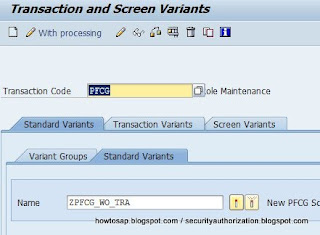
PFCG transport button has been greyed out or disable

  1. Tcode SHD0
  2. Enter the follow
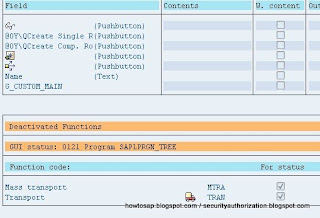
  3. Button is invisible due to this variant. Deactived this variant and transport button is now visible again
Continue Reading

How to SAP - SNC settings on Front End

September 26, 2011   frontend, settings, snc,

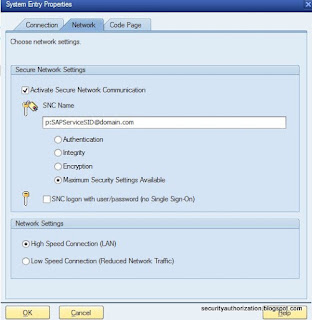
  1. SAP Logon > Right Click any entries > Properties
  2. Network Tab > Check Activate Secure Network Communication
  3. SNC Name > p:SAPServiceSID@domain.com
  4. OK


Continue Reading

HOW TO SAP - ACTIVITY MONITOR FOR MS SQL 2008 R2

September 19, 2011   activity monitor, mssql 2008 R2,

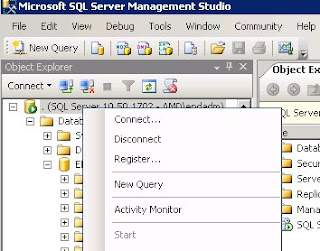
  1. Right click on root node > Activity Monitor
  2. It will take sometime to load on slower system
Continue Reading

HOW TO SAP - Schedule liveCache Log backup every 720 minutes

September 09, 2011   livecache, log backup,

  1. OS level > Run MaxDB

  2. Connect to your database
  3. Instance > Backup > Backup Wizard

  4. Active/Deactive Automatic Log Backup > Next

  5. Create a log backup every 720mins. You may create a new device/file if needed. Click Next when complete

  6. Click On

  7. Activated


Continue Reading

How to SAP - liveCache log full

September 09, 2011   lc10, livecache, log backup, log ful,
Livecache is not responding due to log full. Tcode LCA03 and other liveCache could not be executed.


  1. Tcode LC10 > You notice error was Log Full

  2. Login to OS Level
  3. Open MaxDB

  4. Connect your database

  5. Perform log backup > Instance > Backup > Backup Wizard

  6. Next

  7. Select Log Backup > Next

  8. Enter name for the backup.
    Type in the folder which you want to save the  log file.
    LCQ_LOG is the backup file name.

  9. Click Start and wait. It will auto shrink the log file once backup completed.

Continue Reading
Newer Posts Older Posts Home
Subscribe to: Posts (Atom)
Designed By: Blogger Templates | Templatelib