HOW TO SAP

Step by step manual guide with screenshot for Basis, Security Authorization & Abap

Popular Posts

  • SAP SECURITY INTERVIEW - FIND USER ID FROM TABLE PA0105
    You only  have Personal Number (PERNR) or Email (USRID_LONG) as reference SE16 > PA0105  Now enter PERNR or USRID_LONG SUBTY must be...
  • Table USR02 - User Lock value
    Execute SE16 Enter USR02 Below are the value and its description: Value: 0 Not locked 16 Lock 32 Locked by CUA admin (User Ad...
  • HOW TO SAP - Create RFC TCPIP connection and Register Server Program with RFCEXEC
    Execute SM59 Expand TCP/IP connections > Click Create Enter the following details. Ensure connection type is 'T' Save a...

Blog Archive

  • ▼  2019 (14)
    • ▼  July (4)
      • How to change SAP script - SE71
      • STMS – Transport management system. How to do tran...
      • SAP Basis – Daily check list
      • SAP R/3 Tips and Tricks – Cheat Sheet for Intervie...
    • ►  June (8)
    • ►  May (2)
  • ►  2018 (1)
    • ►  January (1)
  • ►  2017 (65)
    • ►  December (16)
    • ►  November (18)
    • ►  October (26)
    • ►  September (1)
    • ►  August (3)
    • ►  June (1)
  • ►  2014 (1)
    • ►  August (1)
  • ►  2013 (2)
    • ►  December (1)
    • ►  March (1)
  • ►  2012 (5)
    • ►  June (3)
    • ►  February (2)
  • ►  2011 (88)
    • ►  October (3)
    • ►  September (8)
    • ►  August (8)
    • ►  July (4)
    • ►  June (14)
    • ►  May (22)
    • ►  April (11)
    • ►  March (14)
    • ►  February (2)
    • ►  January (2)
  • ►  2010 (1)
    • ►  October (1)
  • ►  2009 (17)
    • ►  October (12)
    • ►  September (1)
    • ►  August (3)
    • ►  June (1)
  • ►  2008 (20)
    • ►  January (20)
2013-2017. Powered by Blogger.
HOW TO SAP

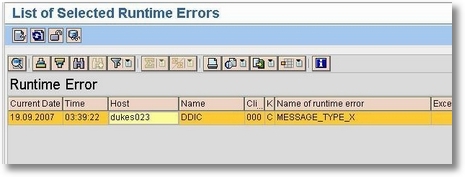
SAP Basis: How to Check ABAP Dumps Message Type X

June 18, 2019   ABAP, BASIS, dumps,
Steps:
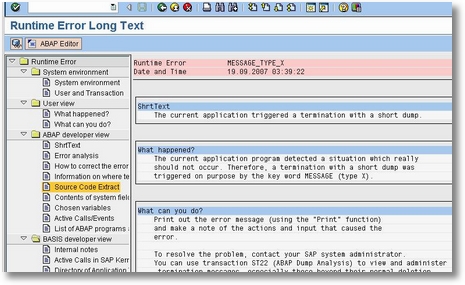
  1. Execute ST22 > Double click on any entries
    0001-dumps-msg-x-001
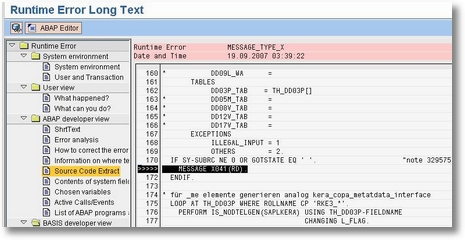
  2. Go to Source Code Extract
    0001-dumps-msg-x-002
  3. Locate “>>>>” and you will see Message X041 in this example. Take note of the Message class and number.
    0001-dumps-msg-x-003
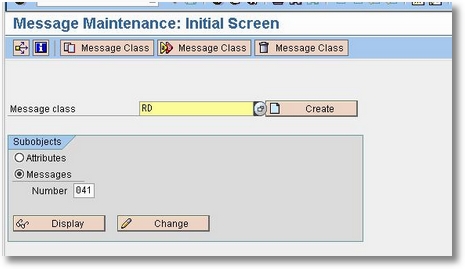
  4. Now open SE91. Enter the details we found from Source Code Extract in ST22:
    -Message Class: RD
    -Message Number: 041
    Click Display
    0001-dumps-msg-x-004
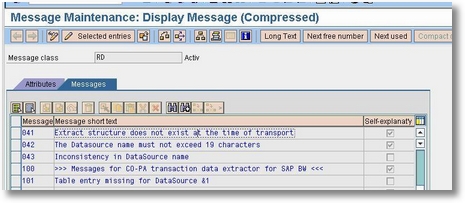
  5. Here, we determine what the message indicates
    0001-dumps-msg-x-006
  6. Now we know that the ABAP Dump message type X is due Extract Structure does not exist at the time of transport. Informed the ABAP consultant or Function consultant about this issue.
Continue Reading

Most common SPOOL error encountered by BASIS. How do we resolve this issue?

June 11, 2019   BASIS, sm37, SPOOL,
Steps
  1. Execute SM37. You found an error Job. When you double click you found
  2. You saw the below error
    0002-spool-error-param1-001
  3. This error is caused by job spooler is not defined when job creation hence it picks up the job owner’s default output device.
  4. Since the default output device is no populated on master user record, the job log can’t find the print parameter.
  5. To resolve the issue, please populate the output device and select your preference for your SAP spool request via transaction code SU3.
  6. For Output device, you can choose one of SAP printer which has been defined in SAP (you can look at via transaction code SPAD)
  7. Recommendation: please do not select LOCL if you want to opt ‘Output immediately’. Moreover, this output device is not good for network performance
  8. Select ‘Output immediately’ if you want to immediate print for every spool request that you create in SAP. Recommendation: do not select this.
  9. Select ‘Delete After Output’ if you want SAP to delete every spool that you create. Recommendation: do not select this. You can manage your spools e.g. printing, reprinting, deletion, etc via transaction code SP01 as below:0002-spool-error-param1-002
Continue Reading

3 SAP HANA Security Best Practices

June 07, 2019   best practices, hana, security,

1 – Operate on a least access rights model. The more access an employee has, the more potential damage they could do to your organization — either through an inadvertent breach or an intentional leak. Because SAP applications play such an integral role in the organization financials, businesses need to restrict each user to the information needed to do their job.
Even display access or access to seemingly innocuous information can potentially expose the organization, and needs to be controlled in line with SAP HANA security best practices. For example, a glance at a bill of materials could show competitors what products the company is working on, or even what it takes to construct a cutting edge project from the ground up.
2 – Ensure you have the right expertise. In previous versions of SAP, all users would interact through the SAP GUI, and use it to access a wide range of SAP applications and development tools. With SAP HANA, users who needs direct access to the database will leverage SAP HANA Studio or SAP Web IDE. Traditionally SAP permissions are controlled via “transactions” and “authorizations.” Inside an SAP HANA database, however, they’re called “privileges.”
They’re conceptually similar but the implementation is different. An ABAP backend Netweaver administrator will have a rather large learning curve to understand how the administration is performed within the SAP HANA database. For example, administration in a HANA database is performed via SQL statements, which can be generated via SAP HANA Studio or SAP Web IDE. This is one of many reasons organizations should consider moving to an IT managed services model after an SAP HANA migration.
3 – Understand how HANA handles objects. HANA applications are built out of development objects, which are stored in the HANA repository. When user and role administration is performed as design-time objects, the roles are owned by the technical user, so personnel can change without affecting the objects. That means they can be transported and versioned, even if the database user changes.
If roles are created as runtime objects, however, they’re associated with the database user — i.e. the actual person who created the role. If that person leaves the organization and is deleted from the database, their role creations and assignments are deleted with them, which can be catastrophic.
Stay safe in SAP HANA. Although security principles vary little between applications, the implementations and knowledge base required do. SAP HANA security best practices require a combination of security expertise and experience and HANA-specific knowledge. Whether you’re looking for an SAP security services partner, or just need someone to get your admin up to speed, contact us to learn how Symmetry can help.


Source https://symmetrycorp.com/blog/3-sap-hana-security-best-practices/
Continue Reading

Video - SAP HANA Creating a User with Schema access

June 06, 2019   creating user, hana, security, video,

https://www.youtube.com/watch?v=L_ICwmBycdQ

Continue Reading

How to create user in SAP

June 04, 2019   Authorization, security, su01, user,
Steps
  1. Execute SU01
  2. Enter user name and press CREATE (notepad)
    0003-creat-user001
  3. Enter necessary details such as Firstname and Lastname
    0003-creat-user002
  4. Click on Logon Data Tab and enter password a password eg: enjoysap123
    0003-creat-user003
  5. Click Save (floppy disk icon). Now you can informed the user that his/her account has been created.
Continue Reading
Newer Posts Older Posts Home
Subscribe to: Posts (Atom)
Designed By: Blogger Templates | Templatelib