HOW TO SAP

Step by step manual guide with screenshot for Basis, Security Authorization & Abap

Popular Posts

  • HOW TO SAP - Create RFC TCPIP connection and Register Server Program with RFCEXEC
    Execute SM59 Expand TCP/IP connections > Click Create Enter the following details. Ensure connection type is 'T' Save a...
  • Useful SAP Security Tcodes
    Security - General tcodes SM20 Analysis of Security Audit Log SM19 Security Audit Configuration STRUSTSSO2 Trust Manager for Logon T...
  • SCUM SETTINGS - LOGON DATA TAB
    SCUM SETTINGS - LOGON DATA TAB has the following settings as below: Global You can only maintain the data in the central system. T...

Blog Archive

  • ▼  2019 (14)
    • ▼  July (4)
      • How to change SAP script - SE71
      • STMS – Transport management system. How to do tran...
      • SAP Basis – Daily check list
      • SAP R/3 Tips and Tricks – Cheat Sheet for Intervie...
    • ►  June (8)
    • ►  May (2)
  • ►  2018 (1)
    • ►  January (1)
  • ►  2017 (65)
    • ►  December (16)
    • ►  November (18)
    • ►  October (26)
    • ►  September (1)
    • ►  August (3)
    • ►  June (1)
  • ►  2014 (1)
    • ►  August (1)
  • ►  2013 (2)
    • ►  December (1)
    • ►  March (1)
  • ►  2012 (5)
    • ►  June (3)
    • ►  February (2)
  • ►  2011 (88)
    • ►  October (3)
    • ►  September (8)
    • ►  August (8)
    • ►  July (4)
    • ►  June (14)
    • ►  May (22)
    • ►  April (11)
    • ►  March (14)
    • ►  February (2)
    • ►  January (2)
  • ►  2010 (1)
    • ►  October (1)
  • ►  2009 (17)
    • ►  October (12)
    • ►  September (1)
    • ►  August (3)
    • ►  June (1)
  • ►  2008 (20)
    • ►  January (20)
2013-2017. Powered by Blogger.
HOW TO SAP

HOW TO SAP - Applying SAP License
April 29, 2011   sap license,
  1. Make sure you already received the license from SAP

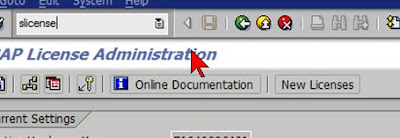
  2. Tcode slicense

  3. If you just perform system copy, then remove old license.

  4. Click "New Licenses"


  5. Delete off all the old exisitng license.


  6. Now you may import in the new license. Click Install
Continue Reading

HOW TO SAP - Request SAP LICENSE from SAP

April 29, 2011   sap license,
  1. Visit http://service.sap.com/licensekey > Keys & Request > License Key


  2. Select request permanent license key


  3. To seach for installation key, go to tcode slicense


  4. Once found your installation, click New System


  5. Enter all the details need from the screen

  6. For hardware key, refer to tcode slicense.

  7. Continue and SAP will ask for your email address so that they can sent you the license file.


Continue Reading

HOW TO SAP - How to approve support packages via solman manager

April 28, 2011   solman, SUPPORT PACKAGES,
  1. There is a shortcut by running functional module

  2. Tcode se37, enter /TMWFLOW/MO_UI_BASKET_AUTHORIZ

  3. Click on test execute


  4. Press execute


  5. Patch waiting for download will be displayed below. Check and then click confirm download
Continue Reading

HOW TO SAP - You cannot logon (CUA system assignment missing)

April 27, 2011   security,
  1. Just reset user password
Continue Reading

HOW TO SAP - The entered password is not downward compatible (see long text)

April 27, 2011   password, security,

  1. Tcode SU01, reset user password and encounter:
    "The entered password is not downward compatible (see long text)"


  2. To resolve, don't type "enter" instead, use mouse and click on Save.
Continue Reading
Newer Posts Older Posts Home
Subscribe to: Posts (Atom)
Designed By: Blogger Templates | Templatelib