HOW TO SAP
Step by step manual guide with screenshot for Basis, Security Authorization & Abap
Popular Posts
How to change SAP script - SE71
1. Firstly open SE71. Enter the Form name. 2. Click change 3. Click on Page window 4. You can now change the attributes. 5. O...
HOW TO SAP - Create RFC TCPIP connection and Register Server Program with RFCEXEC
Execute SM59 Expand TCP/IP connections > Click Create Enter the following details. Ensure connection type is 'T' Save a...
How to SAP - liveCache log full
Livecache is not responding due to log full. Tcode LCA03 and other liveCache could not be executed. Tcode LC10 > You notice error ...
Blog Archive
▼
2019
(14)
▼
July
(4)
How to change SAP script - SE71
STMS – Transport management system. How to do tran...
SAP Basis – Daily check list
SAP R/3 Tips and Tricks – Cheat Sheet for Intervie...
►
June
(8)
►
May
(2)
►
2018
(1)
►
January
(1)
►
2017
(65)
►
December
(16)
►
November
(18)
►
October
(26)
►
September
(1)
►
August
(3)
►
June
(1)
►
2014
(1)
►
August
(1)
►
2013
(2)
►
December
(1)
►
March
(1)
►
2012
(5)
►
June
(3)
►
February
(2)
►
2011
(88)
►
October
(3)
►
September
(8)
►
August
(8)
►
July
(4)
►
June
(14)
►
May
(22)
►
April
(11)
►
March
(14)
►
February
(2)
►
January
(2)
►
2010
(1)
►
October
(1)
►
2009
(17)
►
October
(12)
►
September
(1)
►
August
(3)
►
June
(1)
►
2008
(20)
►
January
(20)
2013-2017. Powered by
Blogger
.
HOW TO SAP
HOW TO SAP - CHECK JAVA SERVER ERROR MESSAGE
June 15, 2011
You may check Java related server issues from
\\user\sap\sid\instance\server\log
Continue Reading
HOW TO SAP - Alternative way to change Log File Severity Levels for Java using NWA
June 14, 2011
log configuration,
nwa,
Instead of using Virtual Admin, we may change the settings from NWA
Open Url http://server.com/nwa
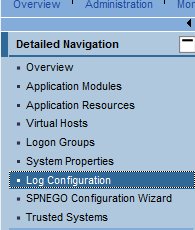
Click Configuration
Select log configuration
Select severity to report only "ERROR"
Lastly, copy it to subtree
Save Configuration
Continue Reading
HOW TO SAP - ADD Authorization to NWDI
June 14, 2011
Authorization,
nwdi,
Open URL
http://<server>.com/useradmin
Enter valid user ID and password
Enter a user ID (our case we choose Administrator).
Select administrator by right clicking on the row
Details of user Administrator will appear below
Click Modify
Select Assigned roles or Assigned Groups tab (ask the requester what need to be added)
This example we add SAP_JAVA_SUPPORT. Highlight and click ADD.
Now click Save
Continue Reading
SAP HOW SOLVE - Failed to load administrator rule file
June 09, 2011
Failed to load administrator rule file,
sap gui,
You encounter Failed to load administrator rule file while installing SAPGUI
This is the error message
Uninstall SAP GUI
Remove all instance of MSXML4.0
Reboot windows
Download MSXML 4 SP3 from Microsoft Website
( http://www.microsoft.com/downloads/en/details.aspx?FamilyID=7F6C0CB4-7A5E-4790-A7CF-9E139E6819C0 )
Reinstall SAP GUI again
Continue Reading
HOW TO FIND JSPM executable file?
June 03, 2011
jspm,
If the shortcut is missing from the desktop, you may find it from
K:\usr\sap\<sid>\DVEBMGS00\j2ee\JSPM\go.bat
Continue Reading
Newer Posts
Older Posts
Home
Subscribe to:
Posts (Atom)
Designed By:
Blogger Templates
|
Templatelib

 Continue Reading
Continue Reading
Continue Reading